> ## Documentation Index
> Fetch the complete documentation index at: https://docs.cloudeval.ai/llms.txt
> Use this file to discover all available pages before exploring further.

# GitHub URL to cloud diagram generation in less than a minute

> Change github.com to cloudeval.ai, create a project from a GitHub-hosted ARM template, then generate diagrams, reports, and exportable review documentation.

<div className="not-prose mb-5 flex flex-wrap items-center gap-2 text-sm text-slate-600 dark:text-slate-400">
  <span>By <a className="font-medium text-emerald-700 underline underline-offset-4 hover:text-emerald-900 dark:text-emerald-300 dark:hover:text-emerald-200" href="https://www.linkedin.com/in/prateekkumarsingh/" target="_blank" rel="noopener noreferrer">Prateek Singh</a></span>
  <span aria-hidden="true">|</span>
  <span>Published July 8, 2026</span>
</div>

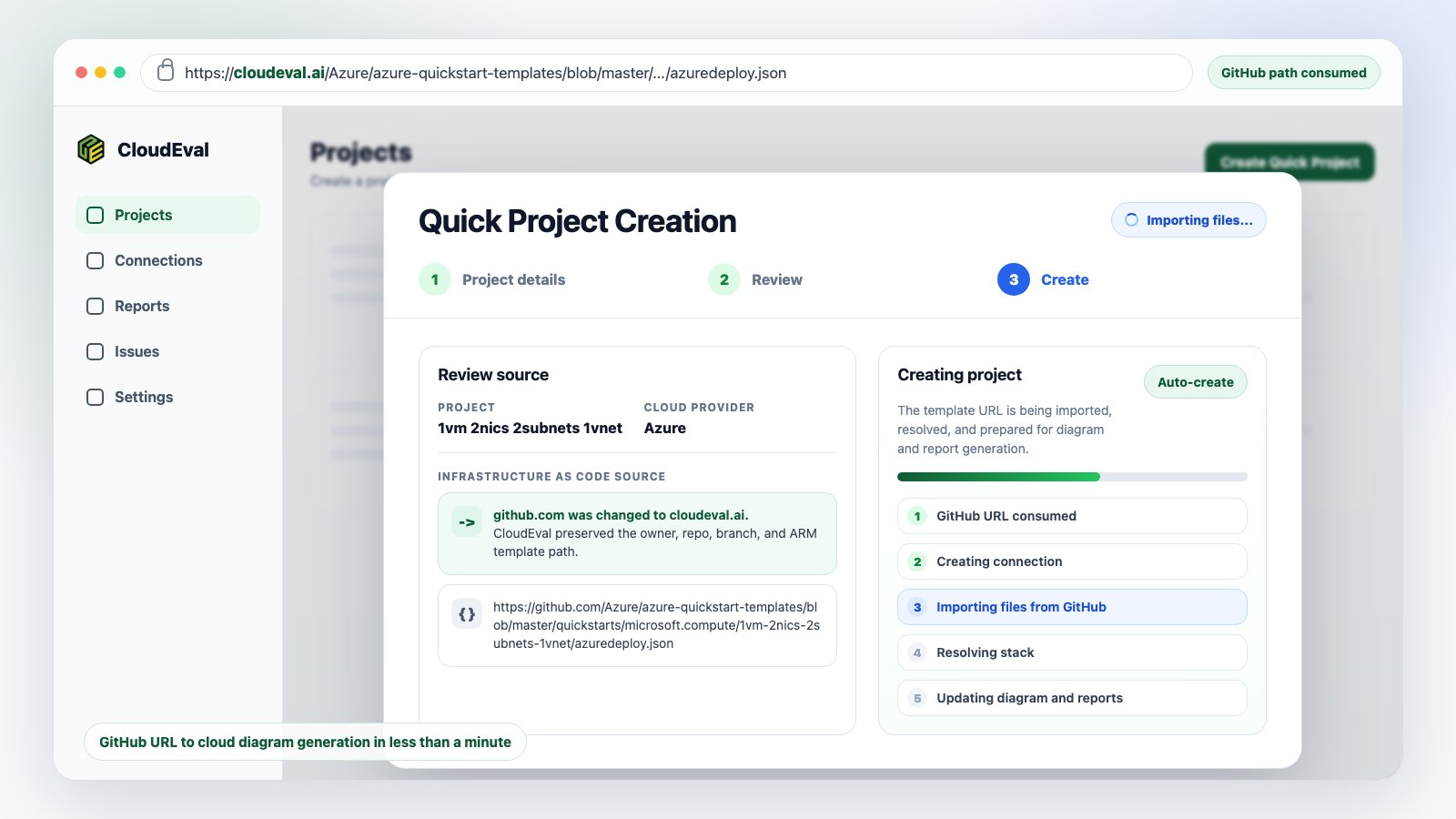
<Frame caption="Quick Project Creation consumes the GitHub-style URL and starts importing the ARM template into a CloudEval project.">
  <img src="https://mintcdn.com/ganakailabs-db727e50/vC9eAljPn_70oJmO/assets/images/projects/github-url-consumption-progress-light.png?fit=max&auto=format&n=vC9eAljPn_70oJmO&q=85&s=5aca78485dc804d4a99a20cde1503f18" alt="CloudEval light themed Quick Project Creation dialog importing files from a GitHub-hosted ARM template URL after github.com is changed to cloudeval.ai" width="1600" height="900" data-path="assets/images/projects/github-url-consumption-progress-light.png" />
</Frame>

<div className="not-prose my-6 rounded-xl border border-emerald-200 bg-emerald-50/70 p-5 dark:border-emerald-900/70 dark:bg-emerald-950/20">
  <p className="m-0 text-sm font-semibold uppercase tracking-[0.14em] text-emerald-700 dark:text-emerald-300">The hook</p>

  <p className="m-0 mt-2 text-2xl font-semibold leading-9 text-slate-950 dark:text-white">
    GitHub URL to cloud diagram generation in less than a minute: keep the repository path, swap <code>github.com</code> for <code>cloudeval.ai</code>, and open a CloudEval project with diagrams and reports ready to review.
  </p>
</div>

Many infrastructure reviews begin with a repository URL. Someone sends an
Azure Quickstart template, an ARM deployment file, or a sample repository path,
and the first reviewer has to decide whether the infrastructure is worth using,
changing, or sending into production.

The slow path is familiar: download the JSON, open another tool, create a
project, upload the file, wait for parsing, then start preparing diagrams and
notes for the actual review.

CloudEval removes that context switch. For supported GitHub-hosted ARM template
URLs, the repository path can become the project creation path. The shortcut is
simple: keep everything after the host exactly the same, and replace only the
domain.

<CodeGroup>
  ```text GitHub URL theme={null}
  https://github.com/Azure/azure-quickstart-templates/blob/master/quickstarts/microsoft.compute/1vm-2nics-2subnets-1vnet/azuredeploy.json
  ```

  ```text CloudEval URL theme={null}
  https://cloudeval.ai/Azure/azure-quickstart-templates/blob/master/quickstarts/microsoft.compute/1vm-2nics-2subnets-1vnet/azuredeploy.json
  ```
</CodeGroup>

Press Enter after the host swap. CloudEval opens the GitHub-style path as a
quick project source, lets you review the import details, and then prepares the
workspace for diagrams, reports, and exportable review documentation.

<Columns cols={3}>
  <Card title="Import the source" icon="github" href="/quickstart/create-a-project-from-a-github-url">
    Use a GitHub-hosted ARM JSON template as the project seed.
  </Card>

  <Card title="Inspect the diagram" icon="network" href="/concepts/diagrams">
    Turn resource declarations and dependencies into an interactive architecture view.
  </Card>

  <Card title="Run reports" icon="chart-no-axes-column" href="/quickstart/run-your-first-reports">
    Generate cost and architecture reports from the same project workspace.
  </Card>
</Columns>

## What CloudEval reads from GitHub

The URL shortcut is intentionally simple, but CloudEval treats the URL as an
infrastructure source rather than a web page.

For the single-template flow, the source should be an ARM JSON template that
CloudEval can read from GitHub. Common GitHub URL shapes are supported,
including `blob`, `tree`, and raw GitHub content URLs when they point to
supported template content.

<Frame caption="The quick project flow keeps the consumed GitHub URL, creation progress, and diagram/report preparation in one visible review state.">
  <img src="https://mintcdn.com/ganakailabs-db727e50/vC9eAljPn_70oJmO/assets/images/projects/github-url-consumption-progress-light.png?fit=max&auto=format&n=vC9eAljPn_70oJmO&q=85&s=5aca78485dc804d4a99a20cde1503f18" alt="CloudEval Quick Project Creation progress state showing a consumed GitHub ARM template URL and import stages for diagram and report preparation" width="1600" height="900" data-path="assets/images/projects/github-url-consumption-progress-light.png" />
</Frame>

The strongest supported path today is Azure ARM JSON.

* Use a public Azure Quickstart ARM template when you want to inspect a known sample.
* Use a GitHub-hosted ARM JSON file when your own repository is already public or accessible.
* Use a raw GitHub content URL when you want to point directly to the template bytes.
* Add a parameters URL when the template needs one and auto-detection is not enough.

If your source of truth is Bicep, compile it to ARM JSON first, then import the
generated ARM JSON file. For linked templates, nested templates, or private
repositories, use the GitHub repository sync workflow instead of a one-off URL.

<AccordionGroup>
  <Accordion title="When the URL shortcut is the right fit" icon="route">
    Use it for the fastest browser path from a GitHub-hosted ARM JSON template
    to a CloudEval project. It works best when the source is a single template
    and reviewers need a quick diagram/report workspace.
  </Accordion>

  <Accordion title="When to use GitHub repository sync" icon="git-branch">
    Use repository sync for private repositories, multi-file IaC projects,
    linked templates, branch provenance, commit tracking, and push-triggered
    refresh through the CloudEval GitHub App.
  </Accordion>

  <Accordion title="When to use local upload" icon="file-up">
    Use upload when the template is generated locally, not reachable by URL, or
    contains source details you do not want to expose through a public GitHub URL.
  </Accordion>
</AccordionGroup>

## From URL to project workspace

After CloudEval resolves the GitHub source, it creates a project workspace
around the infrastructure instead of treating the JSON as a throwaway upload.

<Steps>
  <Step title="Resolve the GitHub-style path">
    CloudEval normalizes the URL and reads the supported ARM JSON content from GitHub.
  </Step>

  <Step title="Create the project shell">
    The project receives a name, provider context, source reference, and source snapshot.
  </Step>

  <Step title="Detect parameters">
    If the GitHub URL follows a recognizable pattern, CloudEval attempts to find a matching parameters file from the same repository.
  </Step>

  <Step title="Parse resources and relationships">
    The template is interpreted as infrastructure code so resources, dependencies, and topology signals can be reviewed visually.
  </Step>

  <Step title="Open the workspace">
    CloudEval redirects into a project workspace where source files, diagram state, report status, and review surfaces live together.
  </Step>
</Steps>

<Frame caption="After project creation, the workspace brings files, report status, validation counts, cost, and architecture context into one place.">
  <img src="https://mintcdn.com/ganakailabs-db727e50/431cYuJMCQHimeRQ/assets/images/projects/github-import-redirected-workspace.png?fit=max&auto=format&n=431cYuJMCQHimeRQ&q=85&s=5434cb66cb1dc056ab2bb9d9b2f8504b" alt="CloudEval project workspace after GitHub URL import showing project files, report cards, code editor, validation count, cost, and Well-Architected status" width="1998" height="1552" data-path="assets/images/projects/github-import-redirected-workspace.png" />
</Frame>

## The diagram is the first review surface

ARM templates can be hard to review directly because the architecture is spread
across resources, parameters, variables, nested deployments, and implicit
relationships. The generated diagram gives reviewers a shared visual model
before they get lost in raw JSON.
<Tabs>
  <Tab title="Architecture view" icon="network">
    <Frame caption="The architecture view shows resources and relationships so reviewers can reason about topology before deployment.">
      <img src="https://mintcdn.com/ganakailabs-db727e50/431cYuJMCQHimeRQ/assets/images/diagrams/architecture-view.png?fit=max&auto=format&n=431cYuJMCQHimeRQ&q=85&s=13e938867067701cc8d7c33efada7820" alt="CloudEval architecture diagram showing Azure resources and relationships in an interactive workspace" width="2896" height="1572" data-path="assets/images/diagrams/architecture-view.png" />
    </Frame>
  </Tab>

  <Tab title="Source plus diagram" icon="columns-3">
    <Frame caption="A split workspace keeps the generated diagram close to the source file that produced it.">
      <img src="https://mintcdn.com/ganakailabs-db727e50/431cYuJMCQHimeRQ/assets/images/diagrams/architecture-code-split-view.png?fit=max&auto=format&n=431cYuJMCQHimeRQ&q=85&s=272d4241c4ab6cc8c3560cdc63901dc1" alt="CloudEval split view with architecture diagram beside the imported infrastructure code" width="2060" height="1080" data-path="assets/images/diagrams/architecture-code-split-view.png" />
    </Frame>
  </Tab>

  <Tab title="Resource details" icon="panel-right-open">
    <Frame caption="Selecting a resource keeps labels, properties, and context close to the graph.">
      <img src="https://mintcdn.com/ganakailabs-db727e50/431cYuJMCQHimeRQ/assets/images/diagrams/resource-details-panel.png?fit=max&auto=format&n=431cYuJMCQHimeRQ&q=85&s=3f83bc56d4142b7bfb8d048336ff72c3" alt="CloudEval architecture diagram with a selected resource details panel" width="2896" height="1572" data-path="assets/images/diagrams/resource-details-panel.png" />
    </Frame>
  </Tab>
</Tabs>

The diagram helps answer practical review questions:

* What resources are in this template?
* Which services depend on each other?
* Does the network shape match the architecture we expected?
* Are public-facing resources obvious before deployment?
* Does the template need to be split into smaller reviewable pieces?

## Reports turn the project into documentation

The project becomes useful to teams when the diagram and source context are
paired with generated reports.

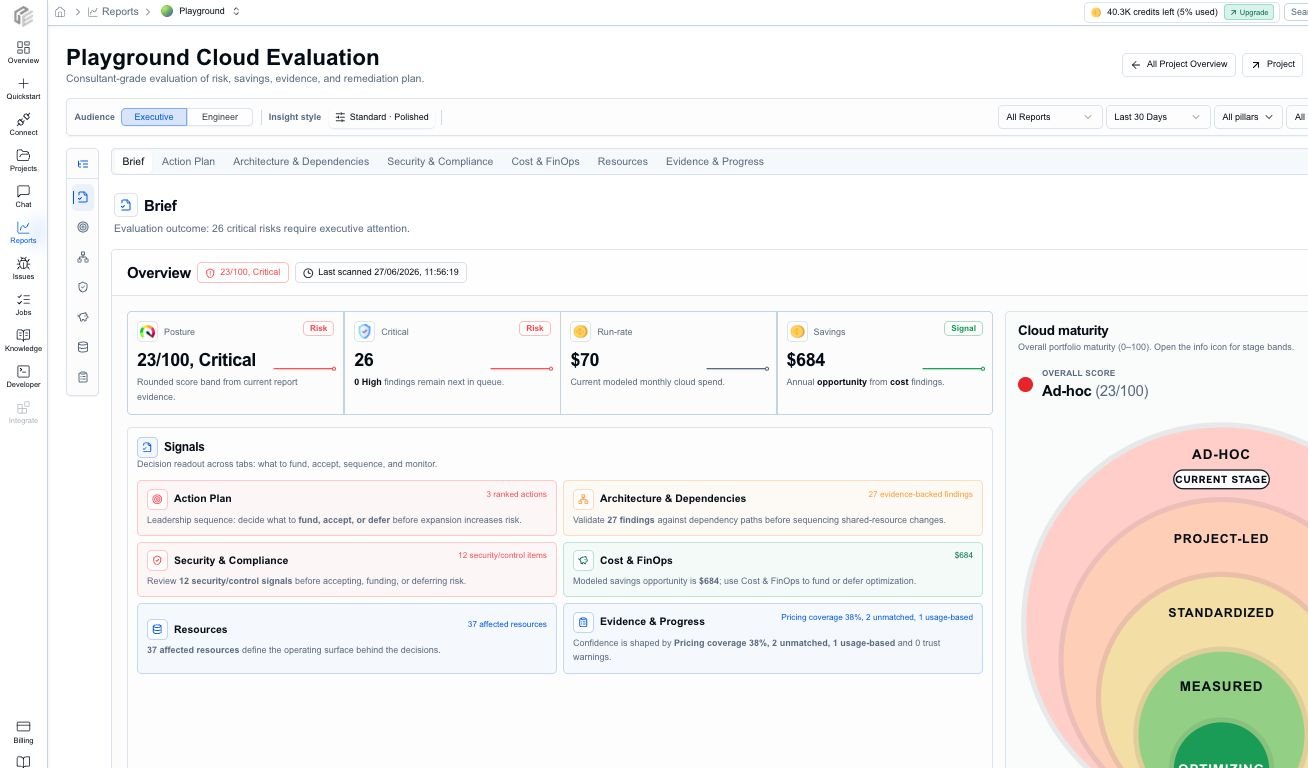
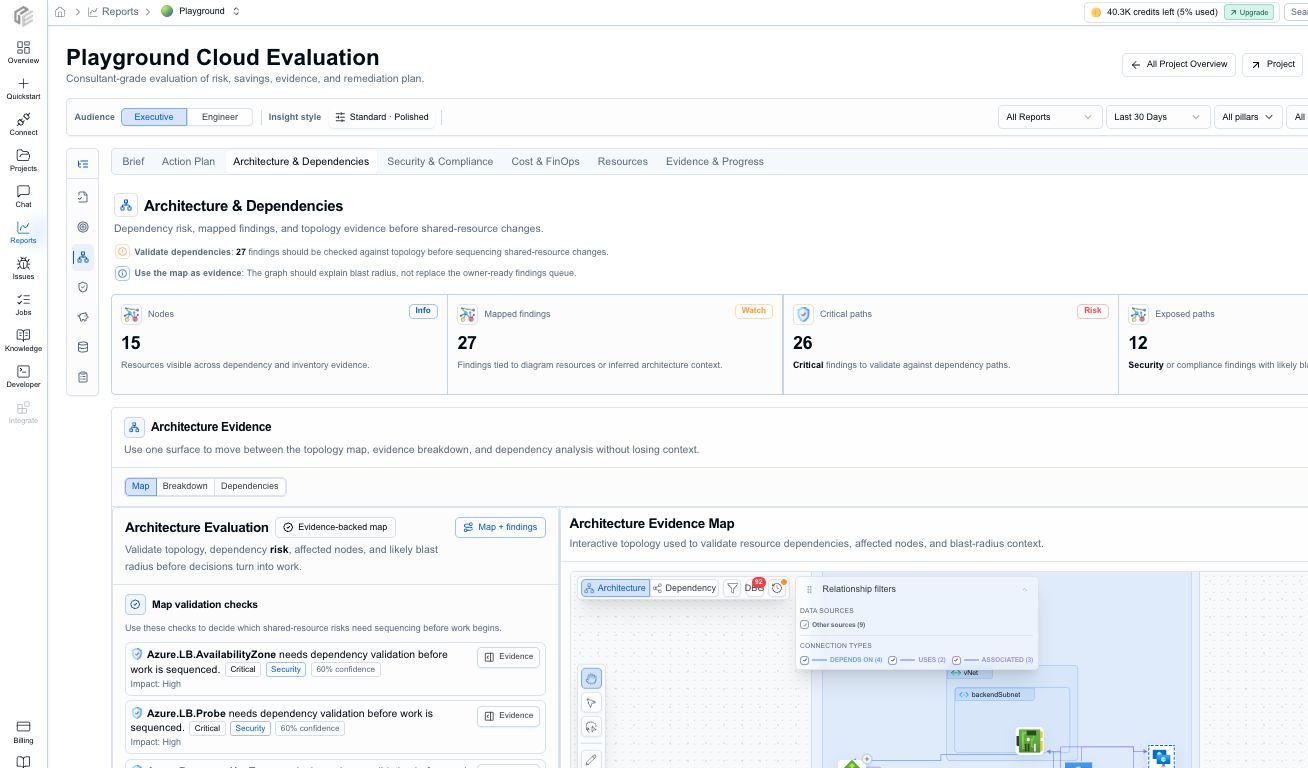
CloudEval reports attach review output to the same project. Depending on the
available evidence, reports can include architecture posture, cost context,
resource inventory, security and compliance signals, assumptions, warnings,
freshness, and suggested next actions.

<Tabs>
  <Tab title="Brief" icon="layout-dashboard">
    <Frame caption="The Brief tab gives stakeholders a concise posture, cost, savings, maturity, and freshness readout.">
      <img src="https://mintcdn.com/ganakailabs-db727e50/7G2QBGQbVygbrIBs/assets/images/reports/report-tab-brief.png?fit=max&auto=format&n=7G2QBGQbVygbrIBs&q=85&s=5ba85b6703797aa77a9063ad3e099a17" alt="CloudEval report Brief tab with posture, critical issues, run rate, savings, maturity, and freshness metrics" width="1308" height="768" data-path="assets/images/reports/report-tab-brief.png" />
    </Frame>
  </Tab>

  <Tab title="Architecture" icon="network">
    <Frame caption="Architecture & Dependencies connects findings back to dependency context and affected resources.">
      <img src="https://mintcdn.com/ganakailabs-db727e50/7G2QBGQbVygbrIBs/assets/images/reports/report-tab-architecture-dependencies.png?fit=max&auto=format&n=7G2QBGQbVygbrIBs&q=85&s=bc7f39e6e3a9f243ceca67bbfddf2402" alt="CloudEval Architecture and Dependencies report tab with design quality, findings, and affected resources" width="1308" height="768" data-path="assets/images/reports/report-tab-architecture-dependencies.png" />
    </Frame>
  </Tab>

  <Tab title="Cost" icon="circle-dollar-sign">
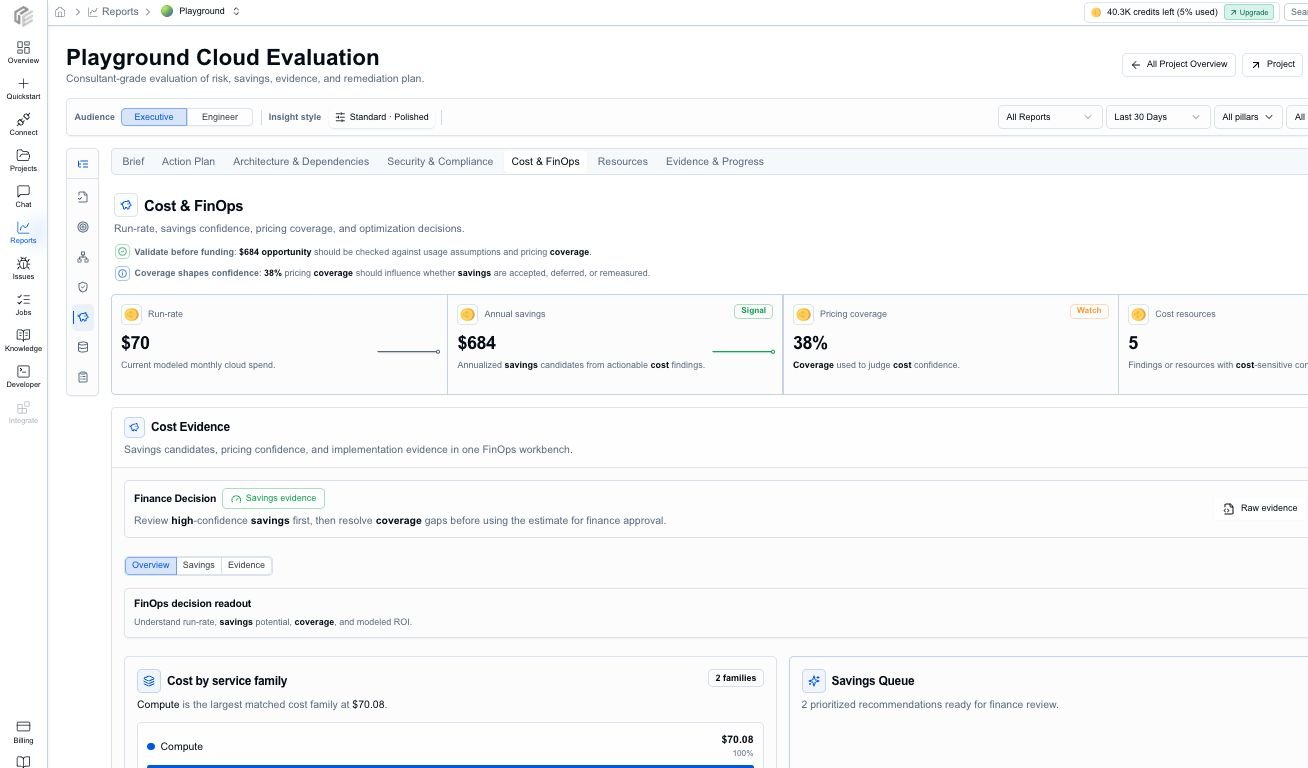
    <Frame caption="Cost & FinOps highlights run-rate context, savings, and cost-focused review signals where cost payloads are available.">
      <img src="https://mintcdn.com/ganakailabs-db727e50/7G2QBGQbVygbrIBs/assets/images/reports/report-tab-cost-finops.png?fit=max&auto=format&n=7G2QBGQbVygbrIBs&q=85&s=c61bfcd71069d71ca54745e3c0b830c4" alt="CloudEval Cost and FinOps report tab with monthly and annual cost context and savings signals" width="1308" height="768" data-path="assets/images/reports/report-tab-cost-finops.png" />
    </Frame>
  </Tab>

  <Tab title="Resources" icon="boxes">
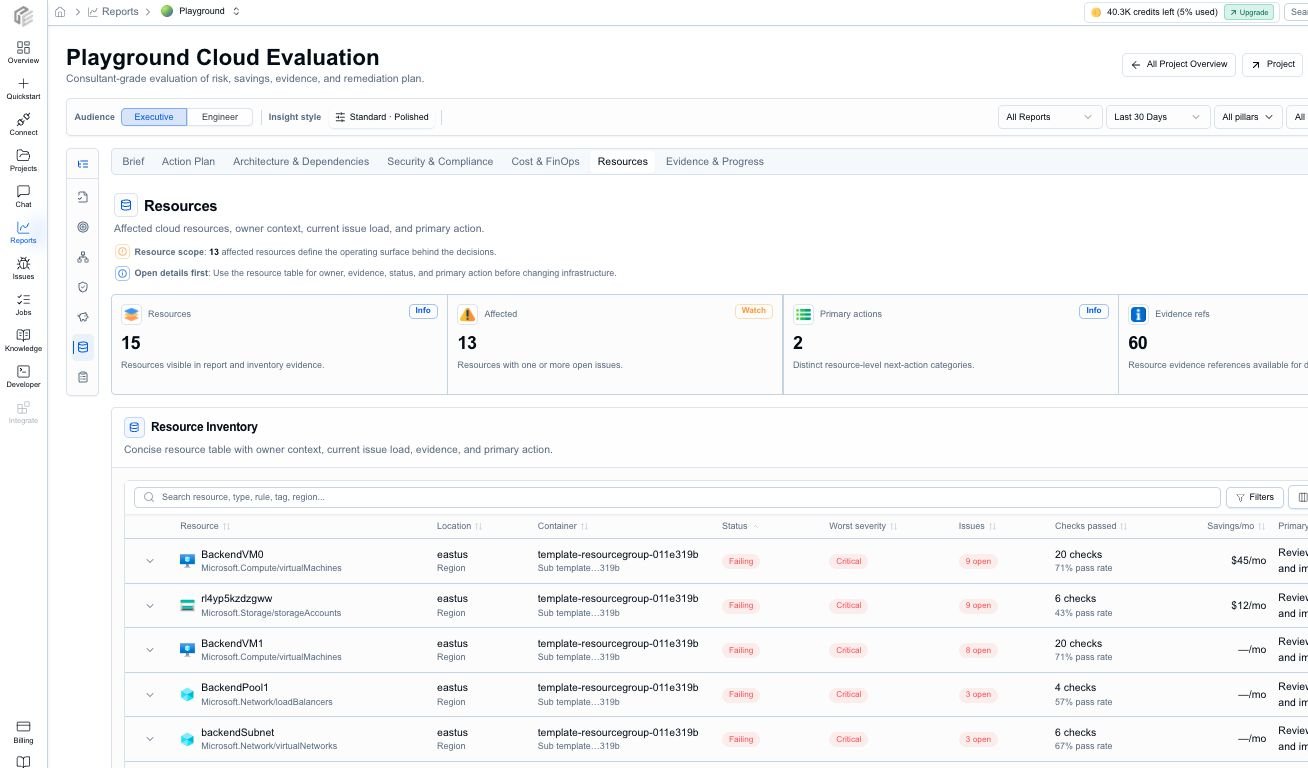
    <Frame caption="The Resources tab keeps inventory, issue count, severity, cost, savings, and evidence close together.">
      <img src="https://mintcdn.com/ganakailabs-db727e50/7G2QBGQbVygbrIBs/assets/images/reports/report-tab-resources.png?fit=max&auto=format&n=7G2QBGQbVygbrIBs&q=85&s=4ffef3b8cd9fcde71300f4cb8ecfbe6c" alt="CloudEval Resources report tab showing resource inventory, status, severity, issue count, cost, savings, and evidence" width="1308" height="768" data-path="assets/images/reports/report-tab-resources.png" />
    </Frame>
  </Tab>
</Tabs>

<Columns cols={4}>
  <Card title="Brief" icon="layout-dashboard">
    Executive readout for posture, urgent risks, run rate, maturity, freshness, and confidence.
  </Card>

  <Card title="Action Plan" icon="list-checks">
    Prioritized findings with effort, owner, impact, confidence, and suggested action.
  </Card>

  <Card title="Architecture" icon="network">
    Dependency context, affected resources, and Well-Architected review signals.
  </Card>

  <Card title="Evidence" icon="file-check">
    Source artifacts, assumptions, warnings, freshness, history, and export context.
  </Card>
</Columns>

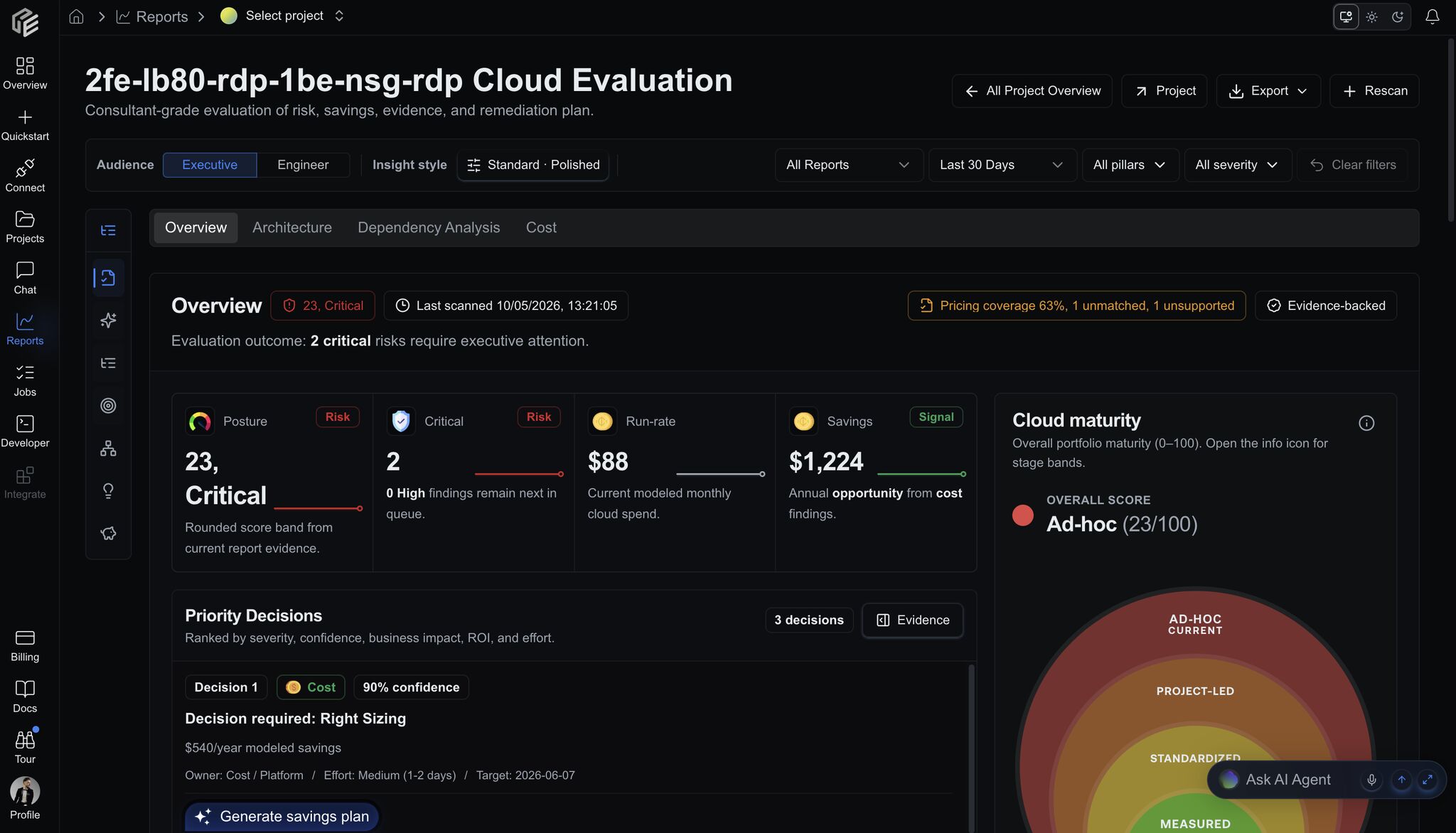
<Frame caption="CloudEval report overview keeps posture, critical issues, run rate, savings, maturity, and freshness visible before reviewers drill down.">
  <img src="https://mintcdn.com/ganakailabs-db727e50/Q5sxR4Wz8SD3FHrz/assets/images/reports/cloud-evaluation-overview.jpeg?fit=max&auto=format&n=Q5sxR4Wz8SD3FHrz&q=85&s=b2da84c0917e83b39811b47b9a9fbb3b" alt="CloudEval report overview showing posture score, critical issues, monthly run rate, savings, maturity, priority decisions, and evidence freshness" width="2048" height="1172" data-path="assets/images/reports/cloud-evaluation-overview.jpeg" />
</Frame>

That is why this flow is more than "generate a diagram from GitHub." It is
URL-to-project, project-to-diagram, and project-to-report in one workspace.

## What "prepares documentation" means

CloudEval does not just render a static picture. It prepares the review material
teams usually need for architecture documentation and handoff.

From the imported GitHub source, the project can produce:

* An interactive architecture diagram for exploration.
* A source-aware workspace with the imported template and related context.
* Report tabs for engineering, platform, security, and stakeholder review.
* Resource-level inventory tied back to findings and affected infrastructure.
* Exportable report packets for meetings, audit handoff, or internal review.
* Markdown, PDF, or JSON report exports where available.
* Agent-ready context for Codex, Cursor, Claude, VS Code, and MCP workflows.

<Frame caption="Report drilldowns give reviewers a concrete place to inspect findings instead of relying on detached summary text.">
  <img src="https://mintcdn.com/ganakailabs-db727e50/431cYuJMCQHimeRQ/assets/images/reports/issues-list.png?fit=max&auto=format&n=431cYuJMCQHimeRQ&q=85&s=80d85a62bb09c534edfeac43bfc35edc" alt="CloudEval issues list with filters, issue summaries, selected finding details, effort, confidence, and suggested actions" width="970" height="964" data-path="assets/images/reports/issues-list.png" />
</Frame>

## Shortcut versus durable sync

The domain-change shortcut is optimized for speed. Repository sync is optimized
for repeatable source-of-truth workflows.

<Tabs>
  <Tab title="Fast URL import" icon="route">
    <Steps>
      <Step title="Open a GitHub ARM template URL">
        Start from the public or accessible GitHub URL your team already shared.
      </Step>

      <Step title="Replace only the host">
        Keep the repository owner, repo, branch, and file path exactly as they are. Swap `github.com` for `cloudeval.ai`, then press Enter.
      </Step>

      <Step title="Review and create">
        Confirm project name, provider, template URL, and optional parameters URL.
      </Step>

      <Step title="Inspect the workspace">
        Open the generated diagram, run reports, and export the review packet.
      </Step>
    </Steps>
  </Tab>

  <Tab title="GitHub App sync" icon="github">
    <Steps>
      <Step title="Install the CloudEval GitHub App">
        Give CloudEval read-only access to the selected repository.
      </Step>

      <Step title="Choose branch and source root">
        Keep commit, branch, and entry-point provenance attached to the project.
      </Step>

      <Step title="Use .cloudeval/config.yaml">
        Define the visualization entry point and linked template behavior when needed.
      </Step>

      <Step title="Refresh from GitHub changes">
        Keep diagrams and reports connected to the repository over time.
      </Step>
    </Steps>
  </Tab>
</Tabs>

<AccordionGroup>
  <Accordion title="Does this require Azure credentials?" icon="key-round">
    No for the initial GitHub URL import. The shortcut works from infrastructure
    code. Connect Azure separately when you want live environment sync.
  </Accordion>

  <Accordion title="Does it work for private repositories?" icon="lock-keyhole">
    Use GitHub repository sync for private source-of-truth workflows. The quick
    URL path is best for public or accessible URLs CloudEval can read.
  </Accordion>

  <Accordion title="Does it replace reports?" icon="file-text">
    No. The URL creates the project seed. Reports are generated from the project
    workspace after source import and setup are ready.
  </Accordion>
</AccordionGroup>

## The takeaway

The shortest CloudEval workflow can start with one small habit:

```text theme={null}
https://github.com/{owner}/{repo}/... -> https://cloudeval.ai/{owner}/{repo}/...
```

That change turns a GitHub-hosted infrastructure template into a CloudEval
project creation path. From there, CloudEval consumes the ARM JSON, prepares
the workspace, generates the diagram, runs reports, and gives the team
exportable documentation for review.

<Columns cols={3}>
  <Card title="Try the GitHub URL flow" icon="github" href="/quickstart/create-a-project-from-a-github-url">
    Create a project directly from a GitHub-hosted ARM template URL.
  </Card>

  <Card title="Run reports" icon="chart-no-axes-column" href="/quickstart/run-your-first-reports">
    Generate cost and architecture reports from the project workspace.
  </Card>

  <Card title="Sync a repository" icon="git-branch" href="/reference/github-repository-sync">
    Use the CloudEval GitHub App when the repository should remain the source of truth.
  </Card>
</Columns>