> ## Documentation Index
> Fetch the complete documentation index at: https://docs.cloudeval.ai/llms.txt
> Use this file to discover all available pages before exploring further.
# Create a project from a GitHub URL
> Use the CloudEval UI to create a project directly from a GitHub-hosted ARM template URL and land in the new workspace.
Use this path when your infrastructure template already lives in GitHub and you want the shortest browser flow from URL to CloudEval project.
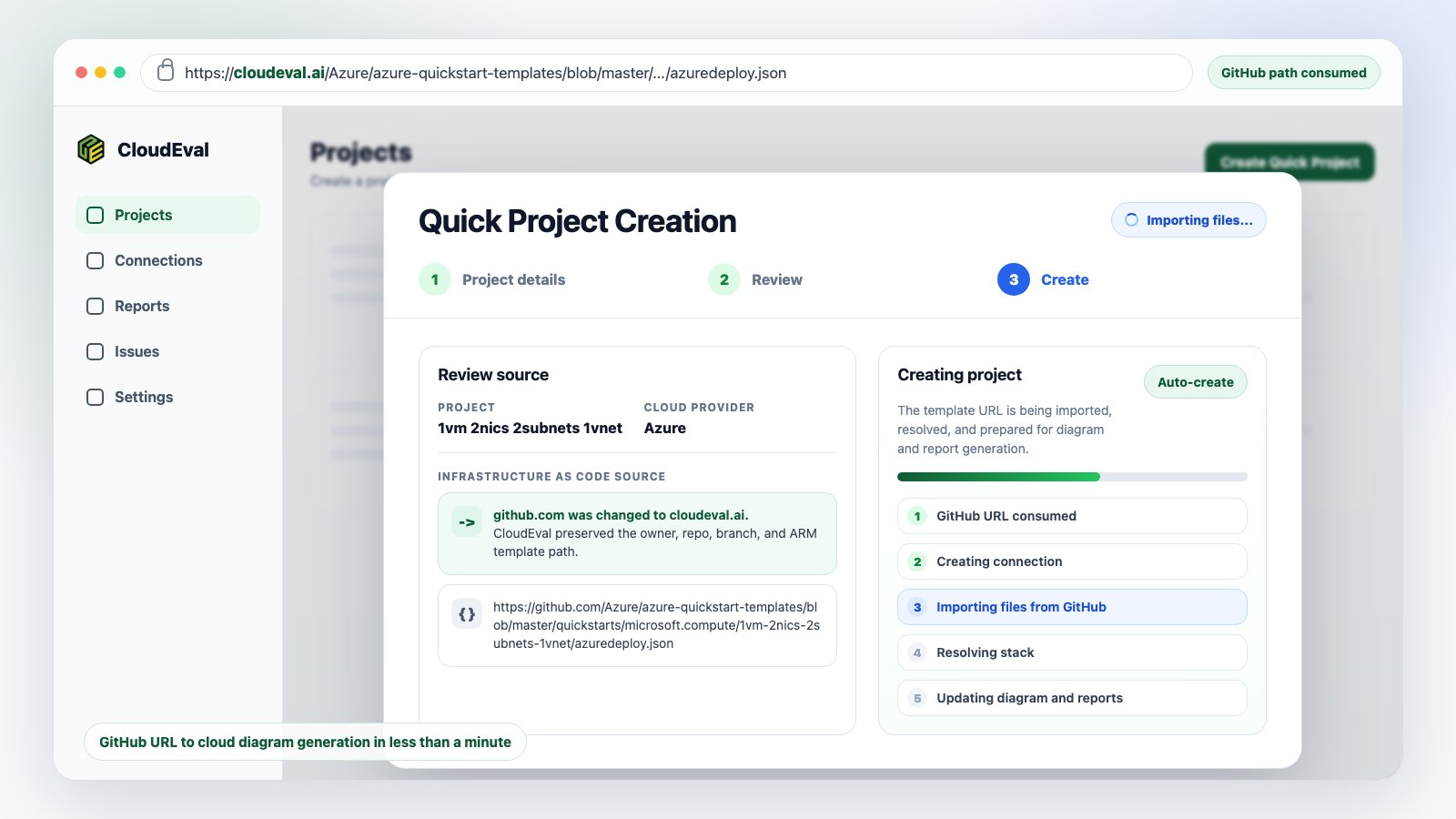
CloudEval can consume supported GitHub template URLs, create the project, and redirect you into the resulting workspace when creation completes. This page covers the **single-template URL** flow. For repository-style inputs with linked or nested templates, use [Import an ARM or Bicep template](/quickstart/import-an-arm-or-bicep-template) and include `.cloudeval/config.yaml`.
 ## Prerequisites
* A signed-in CloudEval account
* A public or accessible GitHub URL to an ARM JSON template
* A parameters file URL if the template requires one and CloudEval cannot auto-detect it
If your source of truth is Bicep, compile it to ARM JSON first, then use the generated ARM JSON URL or upload the generated file.
## Create the project
Open **Projects**, then choose **Create project**.
Select the template URL option and paste the GitHub URL.
CloudEval accepts common GitHub URL shapes such as `blob`, `tree`, and raw GitHub content URLs when they point to supported template content.
When the URL points at GitHub, CloudEval tries to find a matching parameters file from the same repository when the naming pattern is recognizable.
You may see states such as **Looking...**, **Found**, or **Not found** beside the parameters field. If the auto-detected file is not the right one, replace it with the exact parameters file URL.
Confirm the project name, provider, template URL, and optional parameters URL.
After you choose **Review & Create**, CloudEval creates the project and starts setting up the backing connection.
When project creation completes, CloudEval redirects you to the new project workspace.
If background setup is still running, wait for the project status to finish before running reports or sharing the project.
## Prerequisites
* A signed-in CloudEval account
* A public or accessible GitHub URL to an ARM JSON template
* A parameters file URL if the template requires one and CloudEval cannot auto-detect it
If your source of truth is Bicep, compile it to ARM JSON first, then use the generated ARM JSON URL or upload the generated file.
## Create the project
Open **Projects**, then choose **Create project**.
Select the template URL option and paste the GitHub URL.
CloudEval accepts common GitHub URL shapes such as `blob`, `tree`, and raw GitHub content URLs when they point to supported template content.
When the URL points at GitHub, CloudEval tries to find a matching parameters file from the same repository when the naming pattern is recognizable.
You may see states such as **Looking...**, **Found**, or **Not found** beside the parameters field. If the auto-detected file is not the right one, replace it with the exact parameters file URL.
Confirm the project name, provider, template URL, and optional parameters URL.
After you choose **Review & Create**, CloudEval creates the project and starts setting up the backing connection.
When project creation completes, CloudEval redirects you to the new project workspace.
If background setup is still running, wait for the project status to finish before running reports or sharing the project.
 ## When to use this instead of upload
Use **GitHub URL** when:
* the template already has a stable repository URL
* you want teammates to recognize the source
* you want CloudEval to try parameters-file detection
* you want a browser-first flow without downloading files locally
Use **local upload** when the template is private, generated locally, or not available through a URL CloudEval can read.
## When to use this instead of upload
Use **GitHub URL** when:
* the template already has a stable repository URL
* you want teammates to recognize the source
* you want CloudEval to try parameters-file detection
* you want a browser-first flow without downloading files locally
Use **local upload** when the template is private, generated locally, or not available through a URL CloudEval can read.
 ## Agent or CLI handoff
Agents and scripts can open the same browser flow with a prefilled template URL:
```bash theme={null}
cloudeval open projects \
--quick \
--template-url https://github.com/Azure/azure-quickstart-templates/blob/master/quickstarts/microsoft.compute/1vm-2nics-2subnets-1vnet/azuredeploy.json \
--name "Azure quickstart import" \
--provider azure \
--print-url \
--no-open
```
Use `--auto-submit` only when you have already tested the exact URL and defaults you want the browser flow to use.
## Troubleshooting
| Symptom | What to check |
| ---------------------------------------------------- | --------------------------------------------------------------------------------------------------------------------------- |
| CloudEval cannot read the URL | Confirm the URL is public or accessible and points to supported template content. |
| Parameters are not auto-detected | Paste the exact parameters file URL manually. |
| The project opens but reports are unavailable | Wait for project setup to complete, then run cost and architecture reports. |
| The redirected workspace is not the expected project | Check the project name and source URL in the review step before creating another project. |
| The template links to sibling files | Use the multi-file IaC workspace flow with `.cloudeval/config.yaml` so CloudEval can resolve relative `templateLink` files. |
## Next step
Run [your first reports](/quickstart/run-your-first-reports), or read [Diagrams and workspace views](/concepts/diagrams) to understand how the resulting project can be reviewed visually.
## Agent or CLI handoff
Agents and scripts can open the same browser flow with a prefilled template URL:
```bash theme={null}
cloudeval open projects \
--quick \
--template-url https://github.com/Azure/azure-quickstart-templates/blob/master/quickstarts/microsoft.compute/1vm-2nics-2subnets-1vnet/azuredeploy.json \
--name "Azure quickstart import" \
--provider azure \
--print-url \
--no-open
```
Use `--auto-submit` only when you have already tested the exact URL and defaults you want the browser flow to use.
## Troubleshooting
| Symptom | What to check |
| ---------------------------------------------------- | --------------------------------------------------------------------------------------------------------------------------- |
| CloudEval cannot read the URL | Confirm the URL is public or accessible and points to supported template content. |
| Parameters are not auto-detected | Paste the exact parameters file URL manually. |
| The project opens but reports are unavailable | Wait for project setup to complete, then run cost and architecture reports. |
| The redirected workspace is not the expected project | Check the project name and source URL in the review step before creating another project. |
| The template links to sibling files | Use the multi-file IaC workspace flow with `.cloudeval/config.yaml` so CloudEval can resolve relative `templateLink` files. |
## Next step
Run [your first reports](/quickstart/run-your-first-reports), or read [Diagrams and workspace views](/concepts/diagrams) to understand how the resulting project can be reviewed visually.