
Video walkthrough: Cloudeval turns cloud and infrastructure-as-code context into reviewable reports, diagrams, and agent-ready answers.
The problem
Cloud reviews break down when the evidence needed for a shipping decision lives across templates, cloud consoles, cost views, architecture diagrams, security findings, and pull requests.- IaC pull requests
- Live Azure sync
The Cloudeval review loop
Cloudeval turns live cloud context, infrastructure-as-code, and repository provenance into one review surface with diagrams, cost signals, Well-Architected findings, MCP-compatible agent context, and automation-ready gates.Use the same review context in the tools your team already has open.


>_CLIRun reports, ask questions, and script review output.

What you get
CLI and Web workspace
Run reports, ask grounded questions, open deeplinks, and keep the browser for visual review.
1,650+ attributed checks
Turn cloud and IaC inputs into architecture, security, reliability, cost, diagram, and graph checks.
Any agent, anywhere
Use MCP,
llms.txt, headless exports, and CLI output with ChatGPT, Claude, Codex, Cursor, and VS Code.GitHub App and CI review
Sync repositories, run pull-request reviews, post comments, upload artifacts, and fail gates in CI.
Use it when you need 1,650+ attributed cloud and IaC checks, shareable reports, a GitHub review workflow, and agent-ready context without rebuilding the review stack yourself. Applicable checks depend on provider, IaC format, resources, project configuration, and enabled policies. Not every project runs every check.
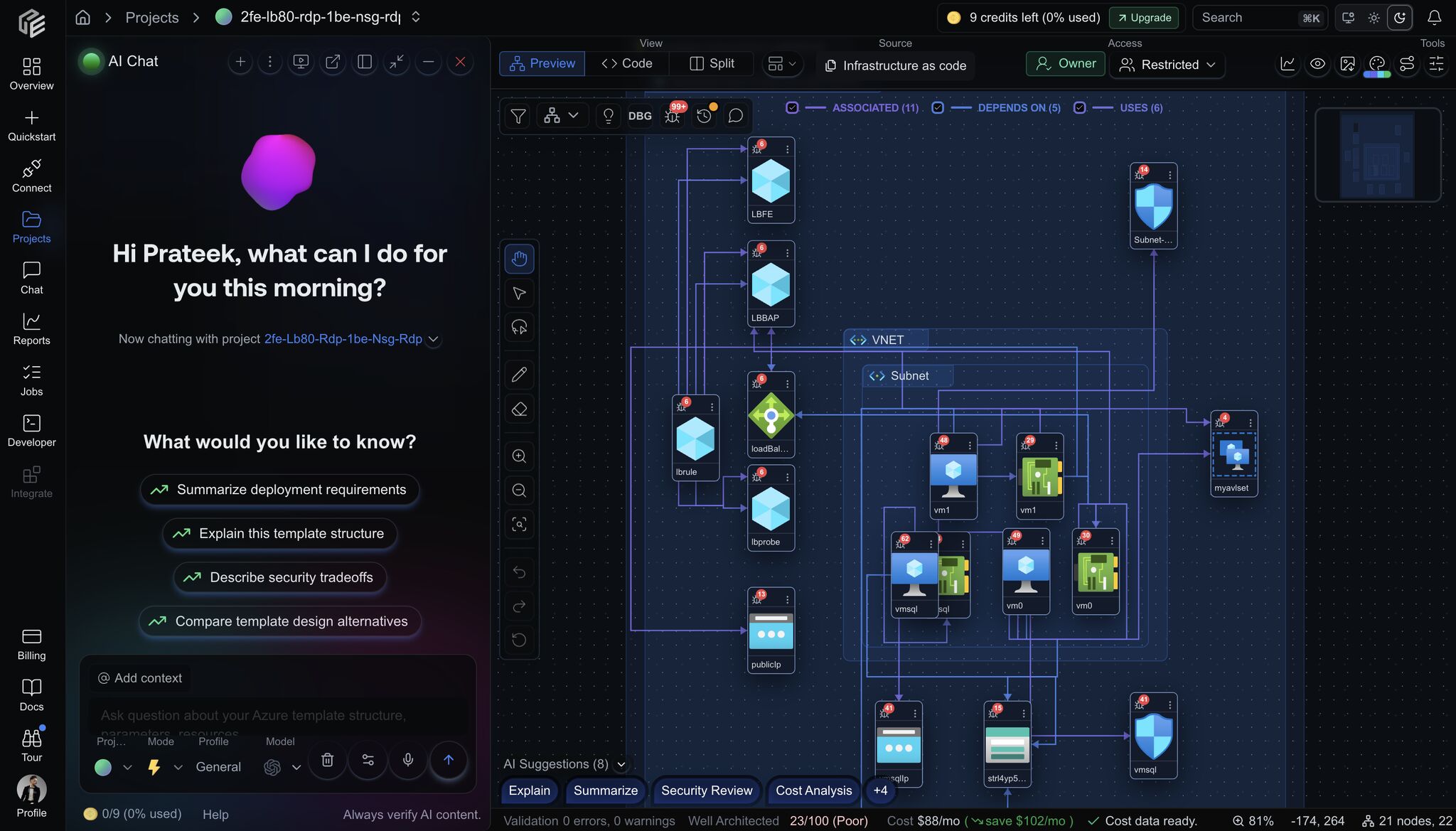
Cloudeval keeps project-aware AI chat next to the architecture graph, source context, report state, and share controls.
Start with one path
Try public sample
Inspect a real example repo and demo PRs before setup.
Use the CLI
Install the CLI, run reports, ask questions, and automate reviews.
Review pull requests
Put Cloudeval review comments, artifacts, and gates inside GitHub Actions.
Connect a source
Choose Cloud sync, a template, a workspace, or a GitHub-backed project.
Set up MCP
Give compatible agents Cloudeval tools, context, and deeplinks.
Check coverage
See what is current, in progress, planned, and intentionally limited.