
Preview — checked 10 September 2026. The Cloudeval server is listed and its build and tool discovery have passed. Glama’s recognition of the existing custom CLI license is still unresolved and can block installation. Authenticated project/report access through Glama, Claude, and ChatGPT has not yet been verified. If installation is unavailable, use direct MCP client setup.
What runs where
Your chat client asks for a tool. Glama runs the Cloudeval CLI’s MCP process, which uses your Cloudeval key to read permitted account data. Your Cloudeval account and hosted services are still required. The published Glama configuration usesreadonly. It can inspect existing project context and reports; it does not start new evaluations. Cloud coverage remains Azure and static AWS CloudFormation evaluation in beta. Hosting does not add live AWS access or broader IaC support.
Before you begin
- A Cloudeval account, at least one project you can grant access to, and permission to manage access keys.
- An existing report in that project for the report example.
- A Glama account and a private Cloudeval deployment.
- A hosting plan suitable for ongoing use. The current Glama UI offers one-day ephemeral sandboxes; retaining a stable deployment requires a subscription. Glama hosting charges are separate from Cloudeval charges.
Create a scoped Cloudeval key
- Open Developer → Access keys in Cloudeval.
- Select Create auth key and choose the MCP Read-only template.
- Give it a recognizable name, such as
Glama read-only. - Select the project or projects the assistant should read. At least one project is required.
- Review the expiry and capabilities. The template defaults to 30 days and includes project, connection, report, download, diagram-export, and MCP access. It does not include billing reads or evaluation runs.
- Select Create key, then copy the one-time secret into your private runtime configuration. You cannot retrieve the raw secret again from the key list.
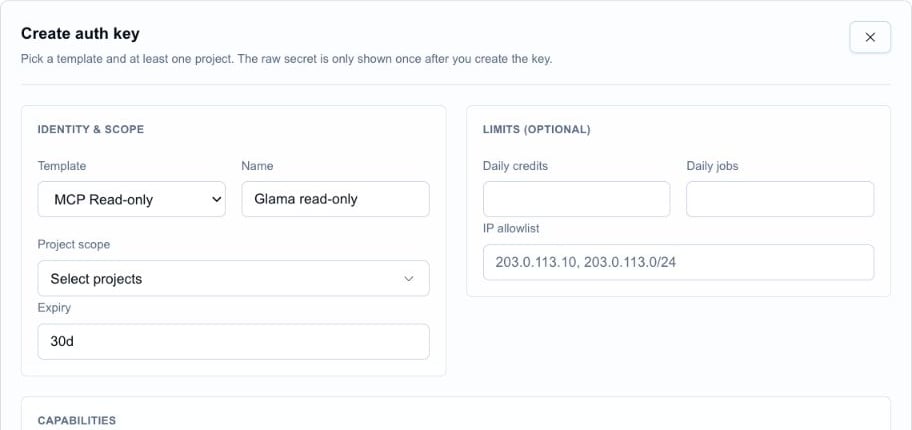
Real Cloudeval create-key form with MCP Read-only selected. This capture stops before project selection and key creation; no key was generated.
Configure the Glama deployment
- Open Cloudeval AI on Glama. Deploy it when installation is available, or open your existing instance under MCP Deployments.
- In the instance’s environment section, select Add Environment Variable if the row is missing.
- Set the name to
CLOUDEVAL_ACCESS_KEYand the value to your own scoped Cloudeval key. - Save the configuration and restart the instance if required. Check that its status becomes started.
These are different credentials. Neither is an Azure or AWS cloud credential. Do not put either secret in a Dockerfile, repository, chat prompt, or public documentation.
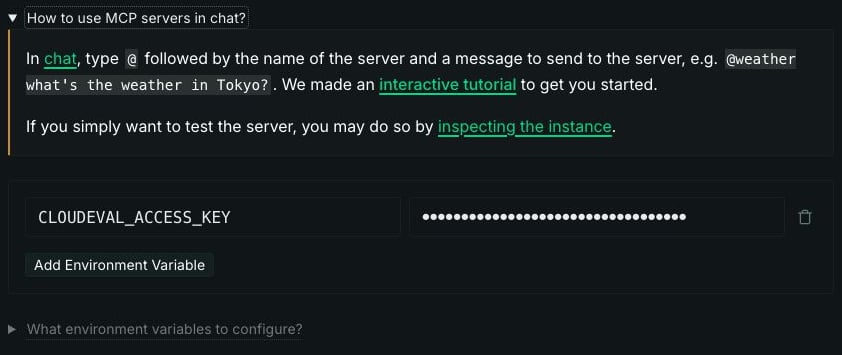
Real Glama deployment controls: browser-chat help and the CLOUDEVAL_ACCESS_KEY environment row. The masked value was an unsaved placeholder; the form was discarded after capture.
Use Glama browser chat
- Open Glama Chat.
- Open the composer’s MCP menu and select Cloudeval AI, or type
@and choose the deployed server. Use its configured instance name if you renamed it. - Send the project-and-report prompt near the top of this page.
- Confirm the selected project, report date, and evidence before relying on the answer.

Real Glama Chat composer with Cloudeval AI selected. This is an unsent example prompt, not a successful authenticated response.
Connect an external client
Open Ingress MCP Connection Profile in your Glama instance. Its Connection URL is the MCP endpoint; the public directory listing URL is not an endpoint. Under Access Tokens, create a Glama token for the connection. Open Install in Client and follow the instructions for your client. Keep the generated configuration private.Claude web and Desktop
- In Glama’s Install in Client dialog, choose Claude. Choose Claude Code only when configuring that separate CLI product.
- Follow Glama’s generated instructions and replace its
<ACCESS_TOKEN>placeholder with your Glama token. - In Claude, open Connectors → Add custom connector, enter the generated connection URL, and complete the connection flow. Team or enterprise workspaces may require an owner to add the connector first.
- Enable the connector in a conversation and run the verification steps below.
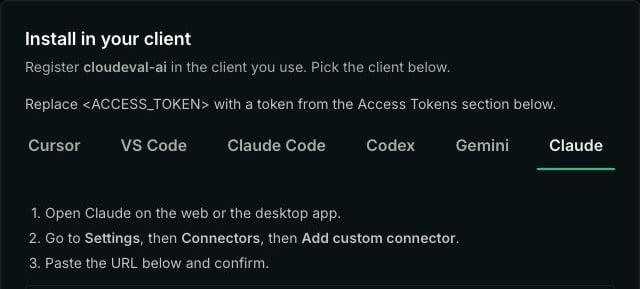
Real Glama Install in Client dialog with the Claude tab selected. The private connection URL below the instructions is excluded from this screenshot.
ChatGPT
ChatGPT supports remote MCP apps through developer mode on eligible accounts and workspaces. See OpenAI’s current setup instructions for availability, app creation, and supported authentication. Cloudeval through Glama remains unverified in ChatGPT. The inspected Glama install dialog has no ChatGPT preset. A compatible private authentication flow must be established before this can be presented as a working setup. A Cloudeval key or Glama bearer token is not an OAuth client secret. Do not make an account-data endpoint public to bypass authentication. Once a compatible connection is available, create a custom MCP app with that endpoint, finish authentication, scan the tools, select the app in a conversation, and run the checks below. Until then, use Glama Chat or direct MCP setup in a supported local client.Cursor, VS Code, Codex, and Claude Code
Glama provides separate presets for these clients. Use the generated command or configuration for your own instance and Glama token. You do not need a local Docker container when the client connects to Glama’s remote endpoint.Verify account access
Run these checks in order through your selected client:capabilities_get: confirm the server responds and exposes the expected toolset.identity_get: confirm authentication succeeds with the intended scoped identity.projects_list: confirm only the projects permitted by the key are available.- Select one returned project, then use
reports_listand an appropriate report tool such asreports_wafto inspect a saved report.