
Video walkthrough: automated pull-request review for infrastructure-as-code changes in GitHub.
Public example
Use ganakailabs/cloudeval-azure-arm-review-example as a clean public reference repository. It contains nested ARM templates,.cloudeval/config.yaml, a ready-to-copy CloudEval review workflow, and long-lived demo pull requests:
CLOUDEVAL_ACCESS_KEY and CLOUDEVAL_PROJECT_ID secrets. The workflow intentionally skips review until those secrets exist.
What it does (and does not do)
The action runs on your workflow runner, installs the CloudEval CLI (unless you skip install), and calls the same CloudEval API as the browser and CLI using a scoped access key (cev_…).
It does not install the GitHub App, change repository settings, branch rules, or files on its own. It can:
- Run
cloudeval reviewfor the checked-out GitHub repository and linked CloudEval project. - Fail a job when explicit
.cloudeval/config.yamlci.gatesare not met. - Attach workflow artifacts (JSON, summaries, downloaded reports).
- Attach
review/review.pdfwhen.cloudeval/config.yamlenables PDF output. - Add PR lifecycle reactions and post/update one result comment per run (same-repo pull requests; fork PRs are often restricted by GitHub token permissions).
mode: review to identify the repository, branch, commit SHA, and dirty working tree state. See the action repo’s full guide for details.
For GitHub-backed projects, the action works against the CloudEval project snapshot created by the GitHub App sync path. The current public Pro path stores that source snapshot and generated evidence in CloudEval-managed storage. Planned Team and Enterprise controls include private deployment, customer-managed storage, custom LLM gateways, and bring-your-own model key options; those are not self-serve Pro capabilities today.
Current vs planned PR capabilities
The GitHub Action path is current for CI review and PR comments. Richer GitHub-native review surfaces are still roadmap work.Prerequisites
Create a CI access key
ask:run when AI summaries are enabled, and github:comment when CloudEval should post PR comments through the GitHub App identity. Older keys without github:comment still work, but comments fall back to github-actions[bot].Create or import the CloudEval project
Add repository secrets
CLOUDEVAL_ACCESS_KEY and, for review/reports, CLOUDEVAL_PROJECT_ID in the consumer repository or environment.Pin the action
uses: ganakailabs/cloudeval-action@v1 or a full commit SHA for supply-chain control.Require the check
PR review workflow
Add the review workflow
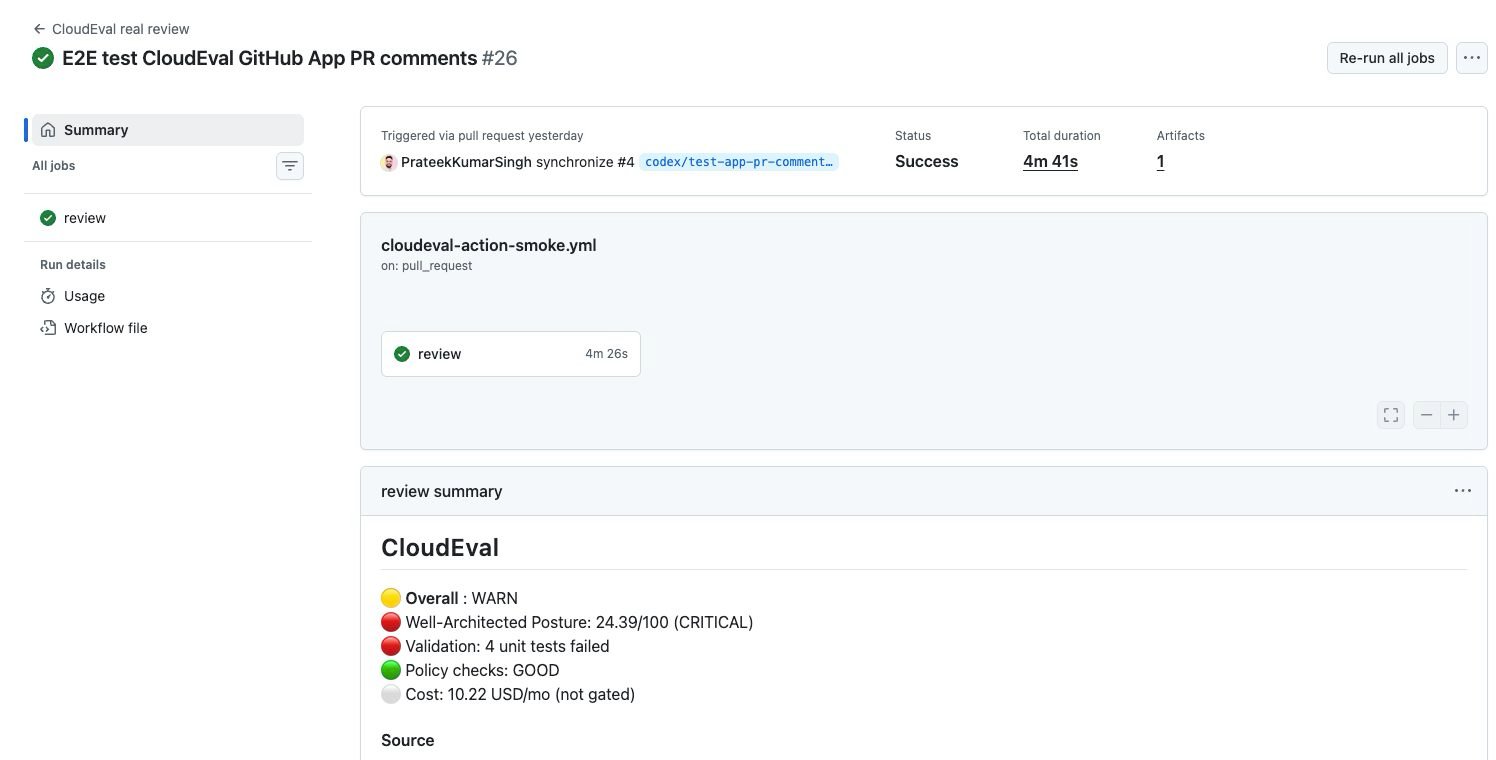
A CloudEval review workflow produces a GitHub Actions job summary, downloadable review artifacts, and a linked PR comment.
Confirm what review mode runs
mode: review runs the high-level CLI command:review.json and review.md. Use --no-wait only for advanced workflows that
want to submit sync and inspect the job separately. Review output includes an
AI-written PR summary by default; disable it with the action input
ai_summary: "false" if CI must avoid model-generated prose.If the runner workspace has uncommitted changes, the CLI stops with:ignore_dirty: "true" only when your workflow intentionally generates local files before review.Enable PR comment output
post_pr_comment: true, the action reacts to the PR with eyes when
review starts and adds a completion reaction when review finishes (+1 for
pass, confused for failure). The review details are written as one
idempotent result comment after the run has report data.For projects linked through the CloudEval GitHub App, CloudEval posts that
comment with the app installation token so the visible author is the CloudEval
GitHub App and the comment uses the app logo. If the app comment route is not
available or the access key does not include github:comment, the action falls
back to github-actions[bot].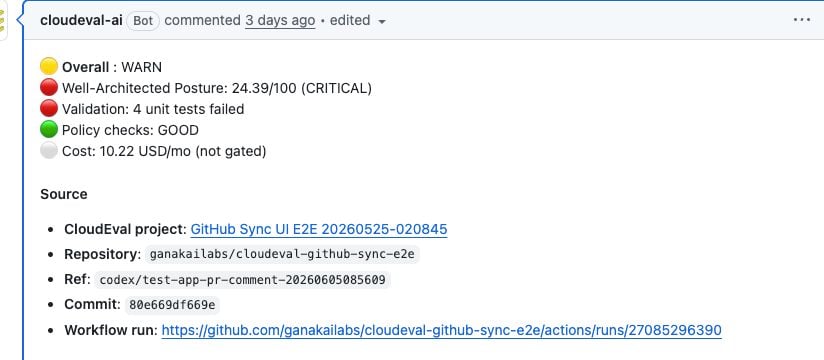
When the project is linked to the GitHub App and the access key includes github:comment, the PR review appears as one CloudEval App comment with source provenance.
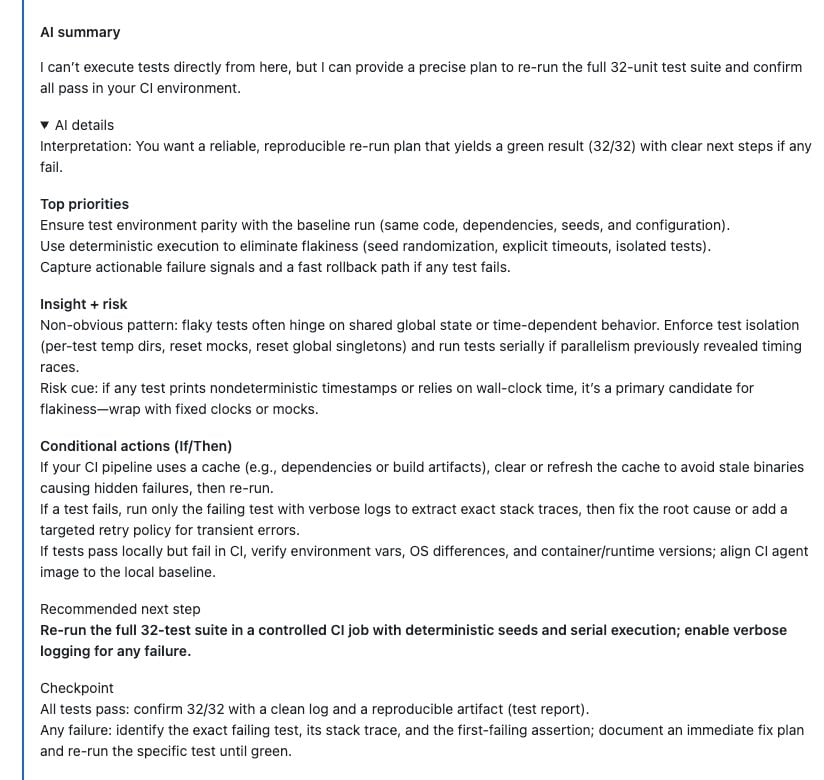
The AI summary appears directly inside the PR comment, with longer reasoning available in the expandable details section.
- the CloudEval project was created from or linked to the same GitHub repository
- the CI access key is scoped to that project and includes
github:comment - the workflow passes
project_id,post_pr_comment: true, and haspull-requests: writeplusissues: write
Inspect review drilldowns
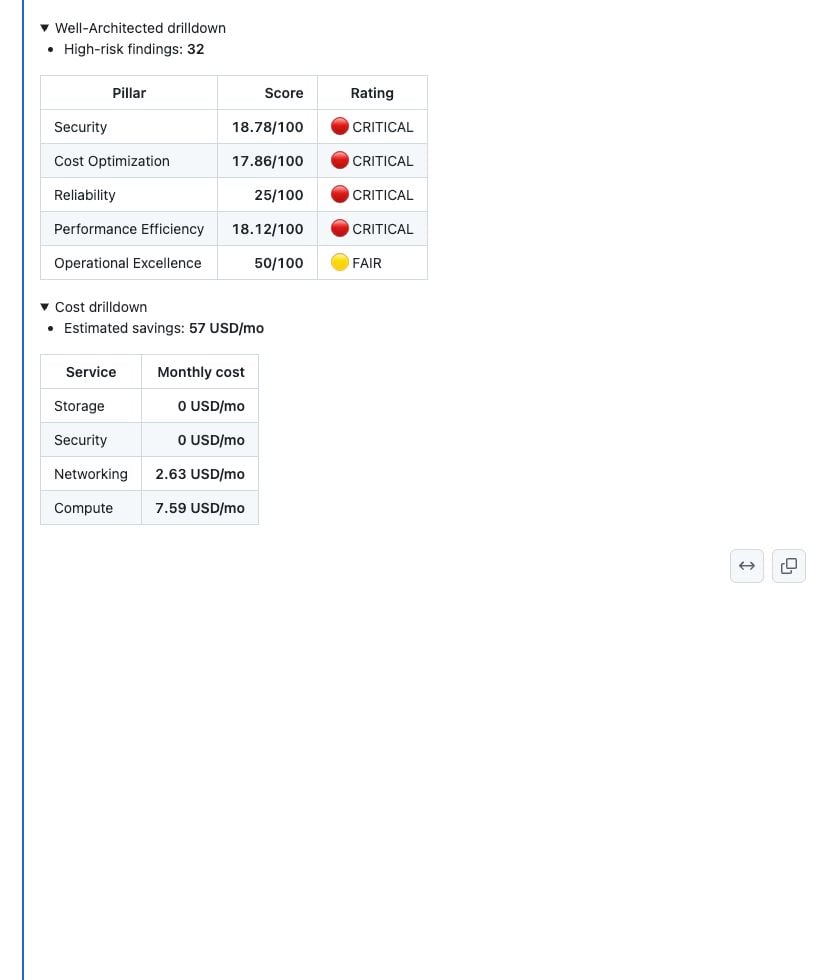
Review drilldowns expand in place for Well-Architected pillar scores and monthly cost breakdowns.
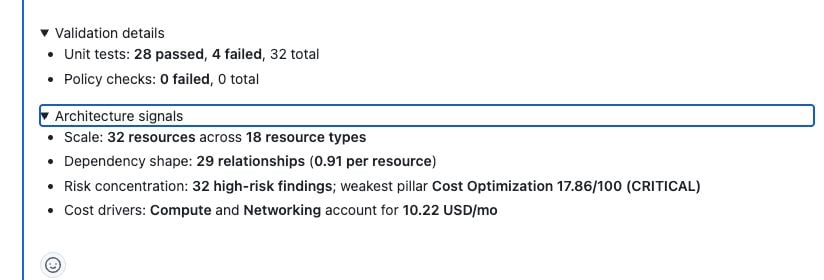
Validation and architecture signals stay in the same review comment so reviewers can check failures and graph context without leaving GitHub.
Config-driven gates
Add ci.gates
ci.gates to .cloudeval/config.yaml when the review should fail the job:Attach a PDF evidence packet
upload_artifacts: true in the workflow and enable ci.review.outputs.pdf.enabled in .cloudeval/config.yaml.PDF badge for the latest hosted export. The GitHub Artifacts badge points to the workflow artifact for that run, which includes review/review.pdf, review/review.md, and review/review.json, even when the review gate fails.Supported PDF parameters:Choose enforcement behavior
ci.gates is missing, review mode returns a warning rather than failing by default. When gates exist, enforcement: block_pull_request fails the job on gate failures. Use enforcement: comment_only to publish the review without blocking merges while the team tunes thresholds. Existing required, warn, overall_score_min, pillar_score_min, fail_on_high_risk, fail_on_validation_errors, and max_monthly_cost keys are still accepted for compatibility.Read the PR comment result
Overall is the gate result from your thresholds. CRITICAL is the observed architecture posture. A PR can show both when thresholds are intentionally permissive, validation/high-risk failures are disabled, or the cost budget is high.Require the workflow check
Use deterministic drilldowns
- Open in CloudEval links for the project preview, architecture report, cost report, validation details, hosted PDF download, workflow run, and review artifacts
- Well-Architected overall and pillar scores
- cost threshold, estimated monthly cost, resource-cost pie chart, savings impact chart, and compact service-cost table
- policy check and unit-test failures
- optional AI summary, generated with
ai_summary_mode: askorai_summary_mode: agent, split into a short summary plus collapsible details - optional
review/review.pdfin the workflow artifact whenci.review.outputs.pdf.enabledis true
Prompt-based merge gate
Switch to gate mode
mode: gate, set gate_jq to a jq expression that yields one number from the CLI JSON (for example .score), and set gate_threshold plus optional gate_operator (ge, lt, eq, …).Set PR comment permissions
post_pr_comment: true only when the job has pull-requests: write plus issues: write and the PR is from the same repository (not a fork), unless you use a different token strategy. These permissions are required for PR lifecycle reactions and for the github-actions[bot] comment fallback. GitHub App-linked projects can post the review comment through the CloudEval App identity when the access key includes github:comment.Add the gate workflow
Reports on a schedule
Setmode: nightly (or reports) with project_id, configure reports_type, and optionally reports_wait so the job waits for report jobs to finish before download.
Why reviewers can trust the output
Every PR review should make the source and evidence path visible enough for a reviewer to check the result without guessing.Reusable workflow
The action repository ships aworkflow_call workflow so other repos can call one shared definition. Pass action_repository and action_ref if you fork. See cloudeval-reusable.yml in the action repo.
Configuration reference
Every input and output is documented in:action.ymlin ganakailabs/cloudeval-action (source of truth)- docs/github-action.md (narrative guide)
Related docs
- Automate evaluations with the CLI — same CloudEval service; use the action when you want a packaged GitHub-native path.
- GitHub repository sync — install the CloudEval GitHub App and keep project files synced from GitHub.
- IaC project config — configure visualization source and CI gates.
- Use the CLI — local install and
cloudeval loginfor interactive work.